I use a lot of AI coding tools, and each of them has at least one feature that makes me wonder why nobody else has done it yet.
They aren’t big, headline-grabbing features, but just small details about how the app should behave, and you can tell someone thought hard about each one.
So if you’re building an AI app, here’s your homework. Go copy it.
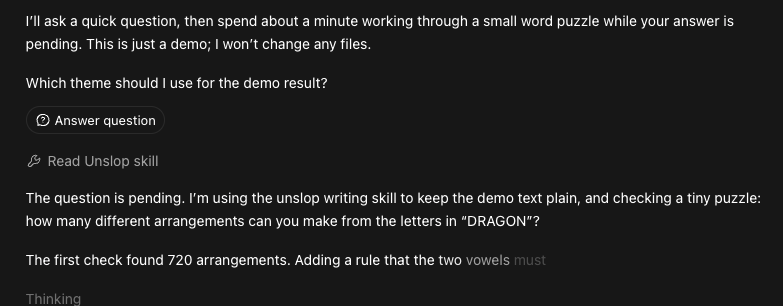
Codex asks questions without stopping
Most agents stop dead when they hit something they’re unsure about. They ask you a question and then sit there waiting. If you’ve wandered off to make a coffee, you come back to find it’s done nothing for ten minutes because it wanted to know whether a variable should be called $user or $account.
Codex doesn’t always do that. It asks the question and keeps working on everything that doesn’t depend on the answer. The question waits for you behind an “answer question” button, and whenever I get round to it, I click it and steer the work from there.
That’s how a good colleague works. They don’t down tools the moment they’re stuck on one thing. They drop you a message and get on with something else until you reply. Maybe a junior colleague would’ve behaved like that - but we are now past the days of AI just being treated like a junior coworker.
Claude Code puts images where you paste them
In most AI apps, pasting an image into the prompt just attaches it. It gets shoved into a tray next to the text box, and the model has to guess which bit of your message it’s about.
That’s fine for one screenshot. It falls apart when you’ve got three.
Claude Code drops the image in wherever your cursor is, as a placeholder right in the text. So I can write “the header should look like [Image #1] but with the spacing from [Image #2]” and there’s no doubt about which is which.
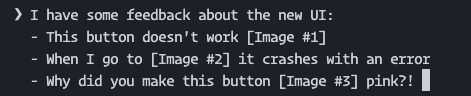
It’s a tiny change. But it makes the image part of the sentence instead of an attachment, which is exactly how I’d point at things if I were explaining them to a person.
Amp runs the work somewhere else
Agents keep getting better at long tasks, which means they’re also getting better at holding my laptop hostage. Kick off a big refactor and now I can’t close the lid, can’t switch machines, and can’t go home without it dying halfway through.
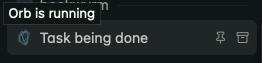
Amp lets you run the work on remote machines it calls orbs. The agent lives there, not on my laptop. I can close the lid, go home, open a different computer and reconnect to exactly where it’s got to.
Once you’ve done that, going back to an agent that’s tied to your terminal feels ridiculous. Why should my laptop battery decide when the work stops?
Amp has ridiculously good workflows and has a for a while; it’s only recently that the big names are fighting for this space with tools like Codex for Cloud, but they’ve still got a way to come to catch up.
Just copy it
Some pride gets in the way of copying features. Nobody wants to look like they’re just chasing whatever the other app shipped last week.
But these tools already borrow from each other all the time, and we’re all better off for it. The good ideas spread and the bad ones die off. That’s how it should work.
None of these three are hard to justify. They’re the kind of feature you use once and then want everywhere.
So go on. Copy their homework.